4 Features That Makes Upprovall Unique

04 March 2026 05:00 PM


Project management made simple. Explore the forever free account you can make at Upprovall.
Upprovall started as a simple idea: project management should be simple.
Built by a group of young professionals in marketing and creative industries, the platform grew out of their firsthand experiences of what works and what doesn’t, when teams try to get things done.
Many project management tools are either too complex or too scattered, leaving teams juggling tasks, messages, and deadlines without a clear way forward. So we designed Upprovall to be a beginner-friendly, simple, and effective platform that no user will struggle or feel left behind. Its main purpose is to improve the way you work.
Here are four Upprovall features that teams love using every day.
Simple Dashboard for Everyone
Upprovall’s dashboard is meant to be clear and straightforward. We want to steer away from other tools with a simple demo but complicated navigation in actual use. Add that there are also too many tabs, settings, and features you don’t actually need.
From the first login, users are welcomed by a clean workspace. Projects are structured logically. Tasks are easy to scan. Key information is visible without overwhelming the screen. There is no steep learning curve, technical barrier, and unnecessary features competing for attention.
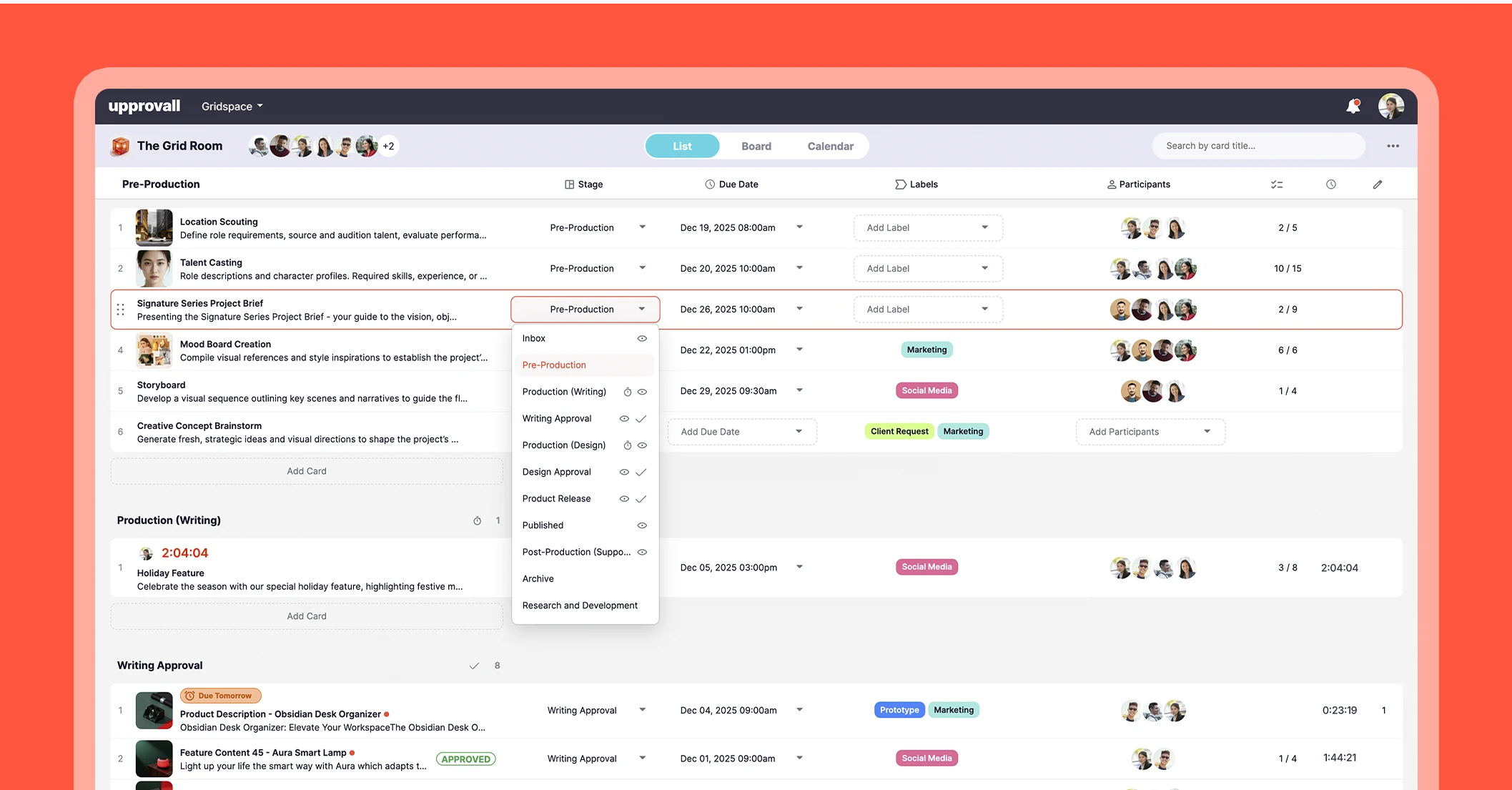
Another thing teams love is how flexible the dashboard feels. You’re not stuck in one layout. Seamlessly switch between List view for structured detail, Board view for visual workflow management, and Calendar view for deadline-driven planning.
This flexibility ensures that different roles and working styles are supported within the same platform. Managers can track timelines, members can focus on tasks, and leadership can view overall progress, all without switching tools. It simply makes your day easier, because sometimes, it’s exactly what teams need.
Stages with Controlled Access
Projects move through clear stages, whether it’s planning, execution, review, or completion. But not every part needs to be visible to everyone.
Upprovall has built-in access control tied to those stages. Visibility is intentional. You determine who can view, contribute to, or manage each phase of a project. Sensitive information remains protected. Internal reviews stay within the team. External collaborators only see what’s relevant to them.
This keeps the workspace cleaner and more focused. No one is overwhelmed by information that doesn’t apply to them. Upprovall only presents a focused view tailored to their role.
Funneled Communication
In a lot of teams, work happens in one place and conversations happen somewhere else. You finish a task, then switch to chat to explain it. Feedback comes through email. A file gets shared in another thread. Before long, half the context is missing.

Upprovall keeps conversations where the work is. If it’s about a task, the discussion sits inside that task. If it’s about a specific stage, it stays there. No bouncing between apps. No digging through old threads trying to piece things together.
When you open a task, you see the whole story: what was suggested, changed, and approved. It’s all right there. Members can just read through the thread and get up to speed.
It also cuts down on repeated questions. Instead of answering the same thing in three different places, the answer lives in one clear spot for everyone involved. No more saying, “wait, where was that sent?”
Just the work and the conversation, side by side, where they should be.
It’s simple, but it saves a lot of time. And honestly, a lot of frustration too.
Minimize Cards
Sometimes you start something and just can’t finish it in one go. Maybe you’re waiting for feedback, or another task popped up that’s more urgent. On most project boards, that unfinished task just sits there, taking up space and making your board look messy. It’s distracting.
Upprovall solves this with the minimize button feature.

The card shrinks down, out of the way, but all your details: notes, attachments, and comments are still there. When you’re ready to dive back in, it’s right where you left it.
Basically, minimized cards let your brain relax a little. You’re not scrolling through a cluttered board trying to remember what to do next. Everything stays organized, but flexible. It's a small feature that makes a big difference in how you get things done.
More in Upprovall
The platform’s combined workflow system ensures structure at every stage. It also has an approval process that is binary and decisive. Reviewers can simply click approve or reject. We also have a time tracking feature that provides measurable insight into task duration. And a revision count, which offers transparent iteration tracking for documenting progress.
Together, these integrated capabilities form a definitive operational framework where visibility, accountability, and efficiency coexist seamlessly.
Conclusion
Upprovall was built for teams that want less stress and more clarity. Every feature, from the dashboard to minimized cards, is designed to help you take control of your work.
And the best part? Your account is free forever.
You can start right now, explore the features, and see how smoother your projects can run. Sign up here.