Replace Sheets with All-in-One Project Management Tool

Alyssa Briones
17 January 2026 04:00 AM


Sheets weren’t built to run projects, yet many teams still force them to fit. It only results in constant manual updates, broken visibility, and version confusion. Replacing them with an all-in-one project management tool will provide structure they can rely on. Here’s how.
Replace Sheets with All-in-One Project Management Tool
If your sheet has more tabs than your browser, it’s time for an upgrade.
Spreadsheets work fine in the beginning. Simple tasks, small teams, and minimal back-and-forth. But the more moving parts you add, the more those tabs multiply, and the harder it becomes to keep everything in sync.
It’s not that spreadsheets are bad; they’ve just never been designed to handle the pace, volume, and coordination modern projects demand. It usually begins with small issues: a task marked complete in one tab but missing in another, or someone accidentally working off an outdated file. Until one file becomes five, then ten. Everyone has their own version of the “latest” update.
And in a fast-moving team, that’s the last thing you need. When your tools slow your progress instead of supporting it, it’s time to switch to something built to grow with you, not crumble under the weight of complexity.
Limitations of Staying in Sheets
Spreadsheets might seem manageable at first, but as projects expand and more people get involved, their weaknesses become impossible to ignore. Here are its main issues:
- Too Much Manual Work
Dates need updating, task statuses must be changed, and formulas need maintaining. Spreadsheets can’t automate any of this. Every update must be entered manually. That increases workload and chances for human error.
- High Risk of Version Mismatch
When teams rely on files shared through email or stored in multiple places, version inconsistencies become a daily problem. Even with cloud-based spreadsheets, overlapping edits can cause overwritten data. This forces teams to double-check every change, wasting valuable time.
- Limited Context Around Tasks
A row in a spreadsheet offers little context. There’s no place for supporting files, conversation history, or linked subtasks. Team members must jump between different tools just to understand what a task requires. It’s a hassle.
- Poor at Handling Complex Workflows
Projects rarely move in straight lines. There are dependencies, approvals, shifting priorities, and unexpected changes. Spreadsheets can’t adapt easily to that level of complexity. You often need several separate tabs to track things, and even then, it’s hard to see how everything connects.
- Not Designed for Long-Term Project Growth
The limitations of spreadsheets become more obvious as more people join a project. Rows multiply, tabs increase, and the file becomes slower. Teams eventually spend more time managing the sheet than the actual project, which defeats its purpose entirely.
Shifting to an All-In-One Project Management Tool
An all-in-one project management platform solves problems that spreadsheets simply weren’t built for. Instead of forcing teams to handle updates manually, the system handles coordination behind the scenes. Everyone will finally get a clear and complete picture of their work.
Here’s what an all-in-one system improves right away:
- One Place for Everything
Each task has its own home where attachments, notes, and comments live together. There’s no jumping between email threads, chat apps, and spreadsheets just to gather context. Everyone will be aligned with less effort.
- Real-Time Updates
Notifications, reminders, recurring tasks, and deadline alerts happen automatically. No refreshing. No version debates. Every edit appears instantly for everyone.
- Smooth Handoffs Between People and Departments
Every task shows its history, owner, due date, and next step. When someone finishes their part, the system nudges the next person automatically. Responsibilities are clear.
- Visual Tracking Tools
Built-in dashboards, timelines, and progress labels provide a comprehensive view of the entire project at a glance. Managers can immediately see which tasks are delayed, which team members are overloaded, and where potential bottlenecks exist.
- Flexible and Scalable
The system adapts to changes in scope or team size. Adding new tasks, members, or projects doesn’t break the workflow. No need to rebuild anythin
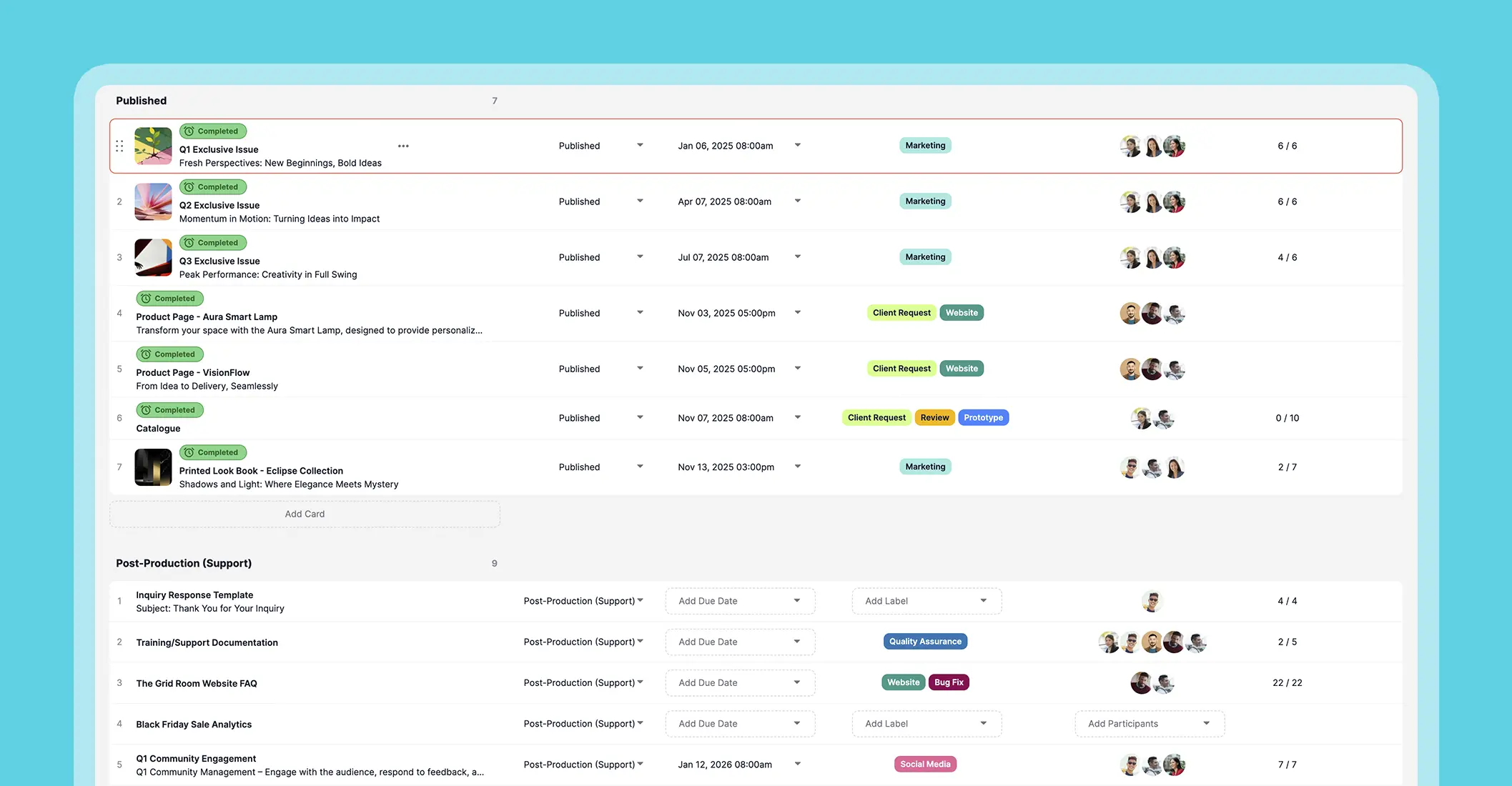
An all-in-one project management tool removes the stress and inefficiency that spreadsheets inevitably create. Gain a reliable system that works for you, starting from unlimited features free forever! Check Upprovall here.
Transitioning from Spreadsheets to a Project Management Tool
Adopting a new tool can feel overwhelming, especially when spreadsheets have been in place for years. But with enough preparation, staged migration, and a well-structured setup, your team can switch confidently. Use this easy-to-follow plan to guide your team from scattered information to a centralized platform.
- Get Your Team Ready
Communicate the “why” behind the change. Explain how the new system will reduce mistakes, save time, and provide better visibility. Offer training sessions and appoint internal champions who can support colleagues and answer questions during the transition. Don’t leave them trying to figure it all out.
If your team is composed of employees from across multiple generations, here’s a simple project management tool that works best for all.
2. Audit Current Spreadsheets
Review all existing spreadsheets and identify what’s essential. Remove duplicates, obsolete tasks, and irrelevant notes. Clean up data and organise it into categories that make sense for your new system.
3. Migrate Data in Phases
Don’t try to move everything at once. Start with priority projects or departments. Test the import process and verify that data appears correctly.

4. Structure Your New Platform
Once your data is migrated, set up projects, tasks, and workflows in the new system. Create standard templates for recurring processes. Establish rules for task updates and approvals to keep work organised.
5. Monitor, Adjust, and Reinforce
Track how the team is using the new system. Address any gaps or confusion promptly and make adjustments to workflows or permissions as needed. Highlight early wins, such as faster task completion or clearer approvals, to reinforce adoption.
Following this roadmap ensures a smooth, low-stress transition. It’s an investment that grows alongside your company over time.
Conclusion
Making the leap from spreadsheets to an all-in-one project management tool is a mindset shift. Teams gain confidence in their processes, leaders get visibility without micromanaging, and everyday tasks move forward without unnecessary steps. Over time, the benefits of fewer mistakes and faster approvals compound.
Want something simple yet powerful? Try Upprovall now.